


Manage your whole team in one place
Manage employees and booth renters together, and give each person their own hours, prices and payment account.
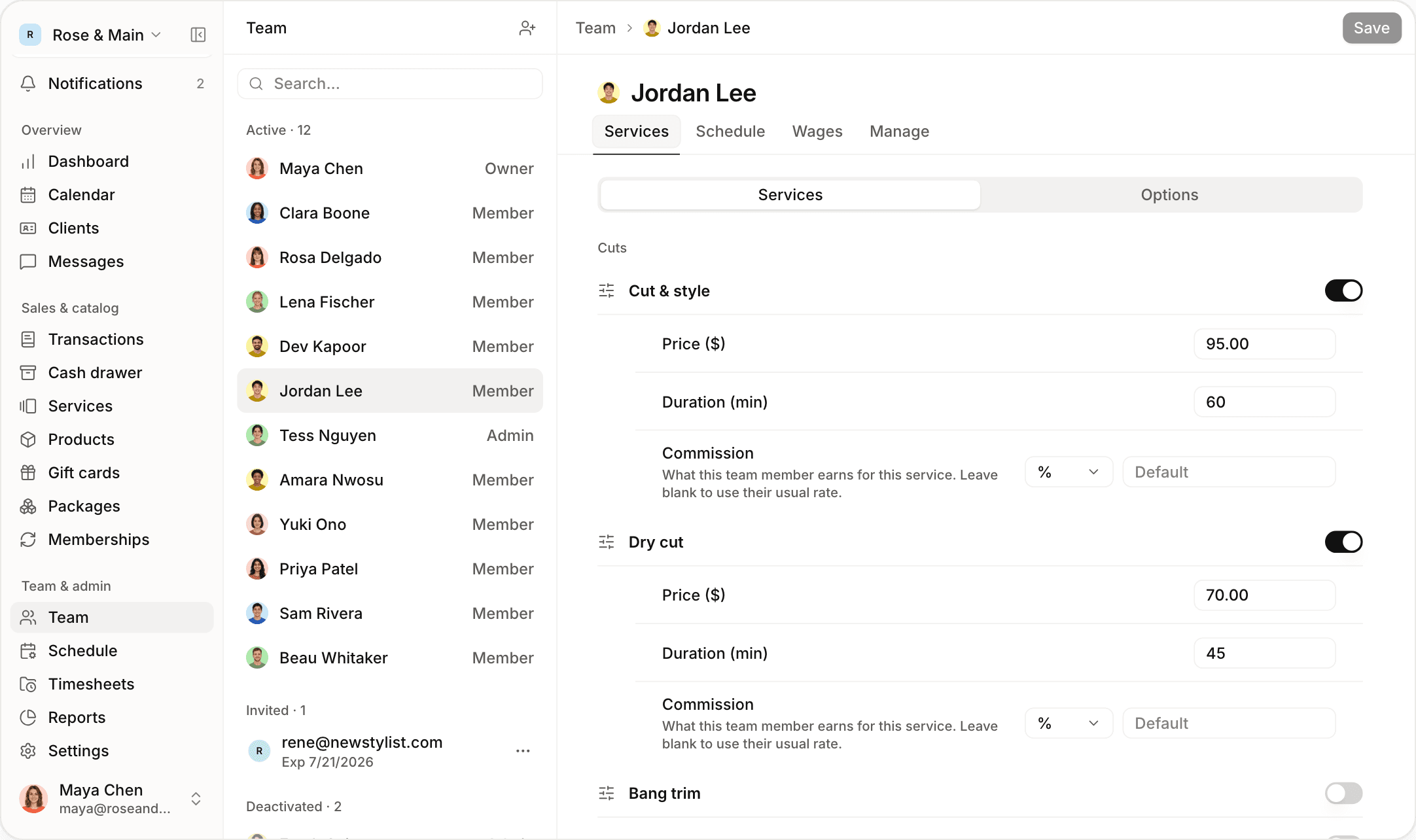

Manage employees and booth renters together
Run your whole team from one account. A client can pay the business and a renter on one check, and Jude runs it as two charges. Renters can also sell retail from their own stock.


Set services and prices for each person
Charge $95 for a service with one person and $70 with another, with different appointment lengths and add-ons. Every provider gets their own booking link, and bookings from it are credited to them.
Set different hours at each location
Schedule someone at Hayes Valley on Monday and Austin on Thursday. When they’re booked at one location, that time comes off online booking at the other, and your front desk gets a warning.
Build repeating schedules
Set each person’s weekly hours once, including split shifts. You can change a single day for a sick day or a holiday without changing the rest of the schedule.

Control what each person can do
Choose an owner, admin or member role for each person, then turn 13 permissions on or off for things like scheduling, commissions and store credit. A locked button stays visible and says who can use it.
Track hours with the time clock
Let your team clock in and out with a four-digit PIN, on the front desk tablet or their own phone. Timesheets feed into hourly pay, and every edit shows who made it.

Also for the team

Email invites
Invite people by email, with a role and a location.

Private pay
Everyone sees their own pay. Only managers see everyone’s.

Hide from online booking
Keep someone on the calendar but off your booking page.

Time off and blocked time
Block out lunch, training or a day off.

Performance report
See appointments, cancellations and no-shows for each person.

Pricing by team size
Deactivated team members don’t count toward your plan.
“Half my team are booth renters and half are employees. That used to mean two logins and a spreadsheet to split up the week’s card payments. Now everyone is in one account, and the renters’ money never goes through me.”
“One of my stylists works downtown three days a week and at our north location the rest. Clients can’t book her at both locations on the same afternoon anymore, which our last system let them do.”
Frequently asked questions
Browse the rest of our features
 Calendar
Run your whole day from one screen
 Online booking
Let clients book themselves online
 Payments
Take payments and pay your team
 Retail & inventory
Sell products and track stock
 Clients
Keep every client’s history and notes
 Messaging
Text clients and send reminders
 Memberships
Bill members automatically
 Gift cards & packages
Sell gift cards and packages online
 Commissions & payroll
Calculate commission, hours and tips
ReportsSee how your business is doing
Browse by business type








Run your business from your phone
Get the full app on iPhone and iPad. Manage your calendar, check clients out with Tap to Pay, and text clients from anywhere.

 Maya Chenowner
 Farah Azizadmin
 Clara Boonemember
 Rosa Delgadomember
 Lena Fischermember
 Dev Kapoormember
 Jordan Leemember
 Tess Nguyenadmin
 Amara Nwosumember
 Yuki Onomember
 Priya Patelmember
 Hugo Prattmember
 Sam Riveramember
 Beau Whitakermember
Give your front desk superpowers
Set up in an afternoon. Try it free for 14 days.