


Let clients book themselves, on your terms
Let clients book from your website or your link without creating an account, and enforce your deposits, deadlines and policies on every booking.
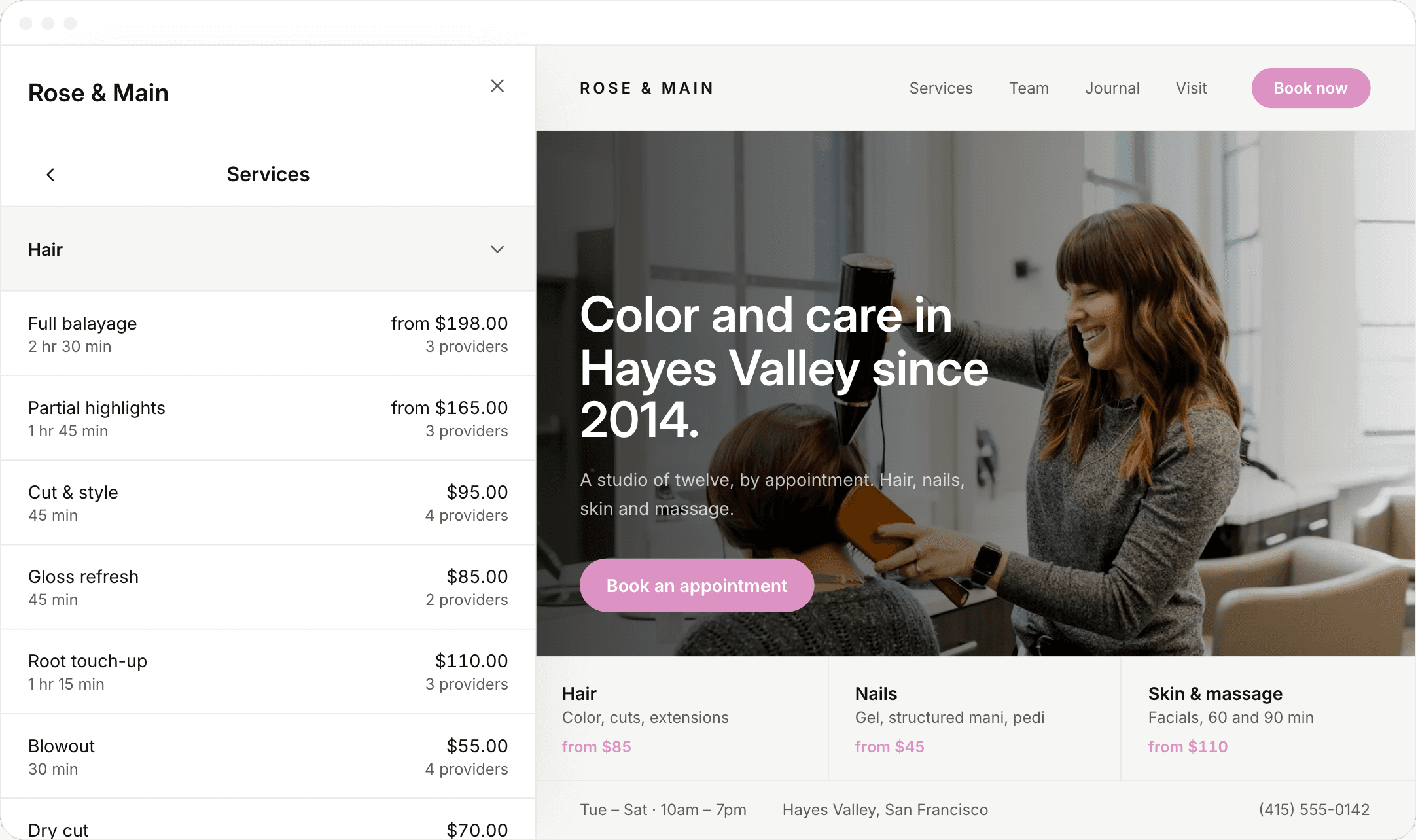
Add online booking to your website
Add booking to your own site as a panel that opens over the page, so clients never leave. You can also share your booking link on Instagram or in a text.
Let clients book without an account
Let clients book with just their name, email and phone number. They don’t need an account or a password, and they sign in with a text code when they come back.
Give clients a portal for their visits
Let clients sign in with a text code to see their upcoming visits, reschedule or cancel within your deadlines, and check what’s left on their gift cards, packages and memberships.
Enforce your cancellation policy
Require clients to accept your policy when they book, and keep a record of it with the booking. Set separate deadlines for canceling and rescheduling, and the booking page enforces them.
Take deposits for the right provider
Require a deposit or full payment, as a fixed amount or a percentage, for each service. When two providers on one visit are paid separately, each deposit goes to that provider’s own account and counts toward the bill.


Offer group booking online
Let a client book for two to five people at once, each with their own provider. Every guest gets their own confirmation and reminder.


Offer add-ons
Offer add-ons with their own price and time, like a deep conditioning treatment with a color service. Clients choose them while booking, and the extra time is added to the appointment.
Sell gift cards, memberships and packages
Let clients buy a gift card, join a membership or prepay for a package right from your booking page, without calling the front desk.
Also on the booking page

Real-time availability
Show only the times your team is actually free.

Booking window and minimum notice
Choose how far ahead, and how late, clients can book.

Links for each location and provider
Bookings from a provider’s link are credited to them.

New booking notifications
Your team gets a notification on their phone.

Confirmations and reminders
Send a confirmation email, and a text clients confirm with YES.

Client notes
Let clients add a note before they arrive.
“A client used to be able to cancel at eight for a nine o’clock appointment, and our old booking page let them. Now they can reschedule until the day before, and after that the page tells them to call us.”
“Clients sign in with a text code, see how many sessions they have left, and book their next visit while they’re there. They used to text me to ask.”
Frequently asked questions
Browse the rest of our features
 Calendar
Run your whole day from one screen
 Payments
Take payments and pay your team
 Retail & inventory
Sell products and track stock
 Clients
Keep every client’s history and notes
MessagingText clients and send reminders
 Memberships
Bill members automatically
 Gift cards & packages
Sell gift cards and packages online
 Team & scheduling
Manage hours, roles and prices
 Commissions & payroll
Calculate commission, hours and tips
 Reports
See how your business is doing
Browse by business type








Run your business from your phone
Get the full app on iPhone and iPad. Manage your calendar, check clients out with Tap to Pay, and text clients from anywhere.

 Maya Chen
 Jordan Lee
 Priya Patel
 Sam Rivera
Give your front desk superpowers
Set up in an afternoon. Try it free for 14 days.