


Treat every client like a regular
Keep every client’s details, history and balances on one profile, and show important notes right when your team needs them.
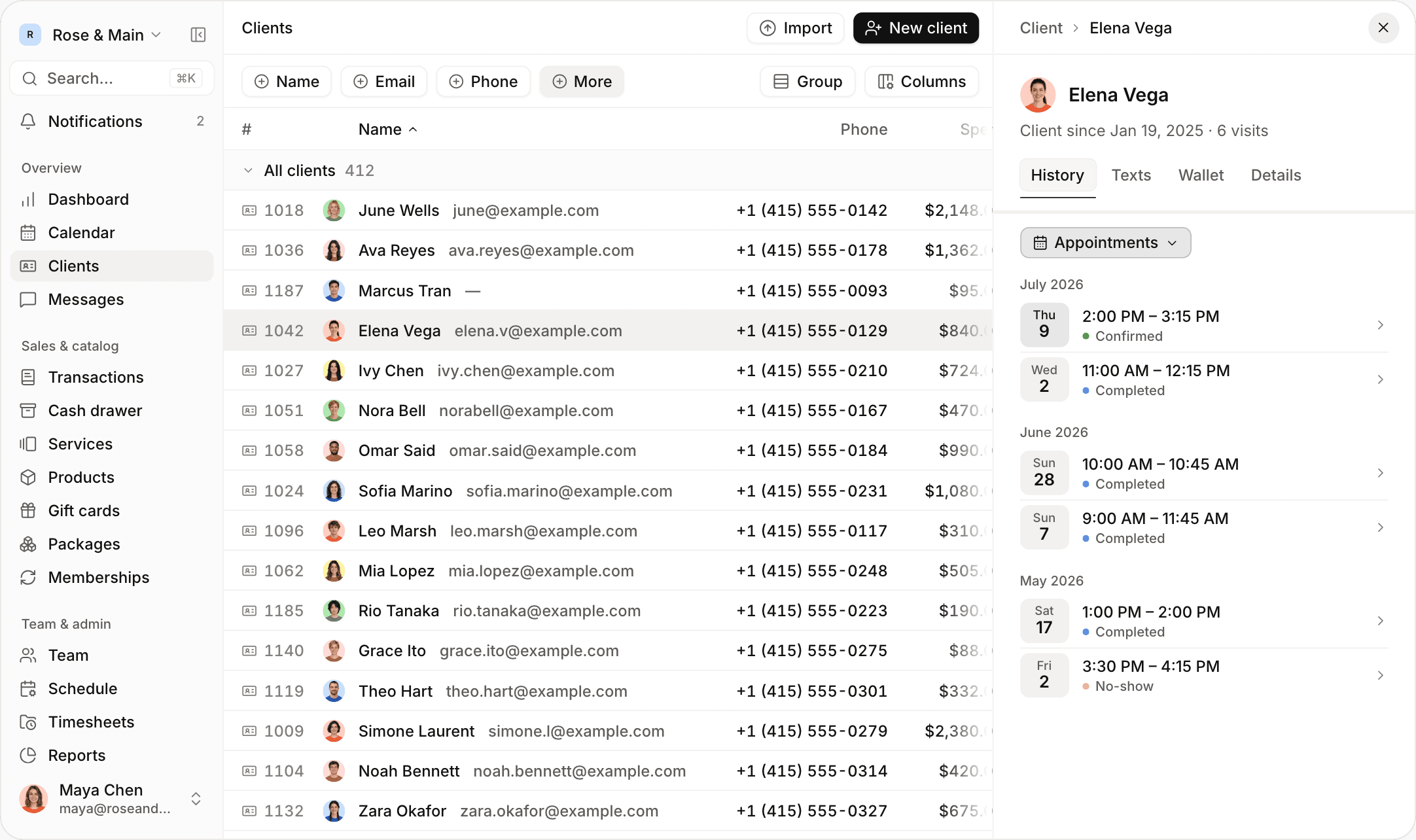

Keep every client’s details in one place
Store contact details, birthdays and notes for every client. Sort and filter your client list by spending, visits, last appointment or birth month.


See a client’s full history
Look up a client’s appointments, sales, payments, refunds and notes on their profile. Add photos and PDFs to any note, and see who wrote it.
Show notes when they matter
Write a note once, and it shows up whenever someone books that client and again at checkout, on the web and on iPhone.

Track what clients have paid for
Keep gift cards, packages, memberships and store credit on each client’s profile, and apply them at checkout. Clients can see their gift cards, packages and memberships online.
Save cards on client profiles
Save a card when a client books online. Charge it in one tap at checkout, use it for a cancellation fee, or renew their membership with it.
Let clients manage their own visits
Let clients sign in with a text code, with no account or password. They can see their upcoming visits, reschedule or cancel within your deadlines, and check their balances.
Bring your client list with you
Upload a spreadsheet from any system. Jude matches the columns and shows you who will be added and who is already a client, before anything is saved.
Find clients who are due back
See which clients are overdue for a visit, based on how often each one usually comes in. Their phone number is right there, so it’s easy to reach out.


Also for clients

Client filters
Filter by revenue, visits, last appointment, birth month or city.

Spending columns
Sort your client list by total spent and number of sales.

Text history
See a client’s text conversation on their profile.

Store credit
Issue credit with a reason, and apply it at checkout.

Automatic profiles
Create a profile automatically when someone books online.

Photos on notes
Add up to ten photos or PDFs to a note.
“The allergy note used to be three clicks deep, and nobody looked at it. Now it shows up on the booking and again at checkout, so people actually read it.”
“I uploaded our client export, and all 900 clients were in before lunch. Jude told me 38 were already there and flagged 4 phone numbers it couldn’t read. The last time we switched systems, that took a week of retyping.”
Frequently asked questions
Browse the rest of our features
 Calendar
Run your whole day from one screen
 Online booking
Let clients book themselves online
 Payments
Take payments and pay your team
 Retail & inventory
Sell products and track stock
MessagingText clients and send reminders
 Memberships
Bill members automatically
 Gift cards & packages
Sell gift cards and packages online
 Team & scheduling
Manage hours, roles and prices
 Commissions & payroll
Calculate commission, hours and tips
ReportsSee how your business is doing
Browse by business type








Run your business from your phone
Get the full app on iPhone and iPad. Manage your calendar, check clients out with Tap to Pay, and text clients from anywhere.

 June Wells+1 (415) 555-0142 · june@example.com
 Ava Reyes+1 (415) 555-0178 · ava.reyes@example.com
 Marcus Tran+1 (415) 555-0093
 Elena Vega+1 (415) 555-0129 · elena.v@example.com
 Ivy Chen+1 (415) 555-0210 · ivy.chen@example.com
 Nora Bell+1 (415) 555-0167 · norabell@example.com
 Omar Said+1 (415) 555-0184 · omar.said@example.com
 Sofia Marino+1 (415) 555-0231 · sofia.marino@example.com
 Leo Marsh+1 (415) 555-0117 · leo.marsh@example.com
 Mia Lopez+1 (415) 555-0248 · mia.lopez@example.com
 Rio Tanaka+1 (415) 555-0223 · rio.tanaka@example.com
 Grace Ito+1 (415) 555-0275 · grace.ito@example.com
 Theo Hart+1 (415) 555-0301 · theo.hart@example.com
 Simone Laurent+1 (415) 555-0279 · simone.l@example.com
 Noah Bennett+1 (415) 555-0314 · noah.bennett@example.com
 Zara Okafor+1 (415) 555-0327 · zara.okafor@example.com
Give your front desk superpowers
Set up in an afternoon. Try it free for 14 days.