


Run your whole day from one calendar
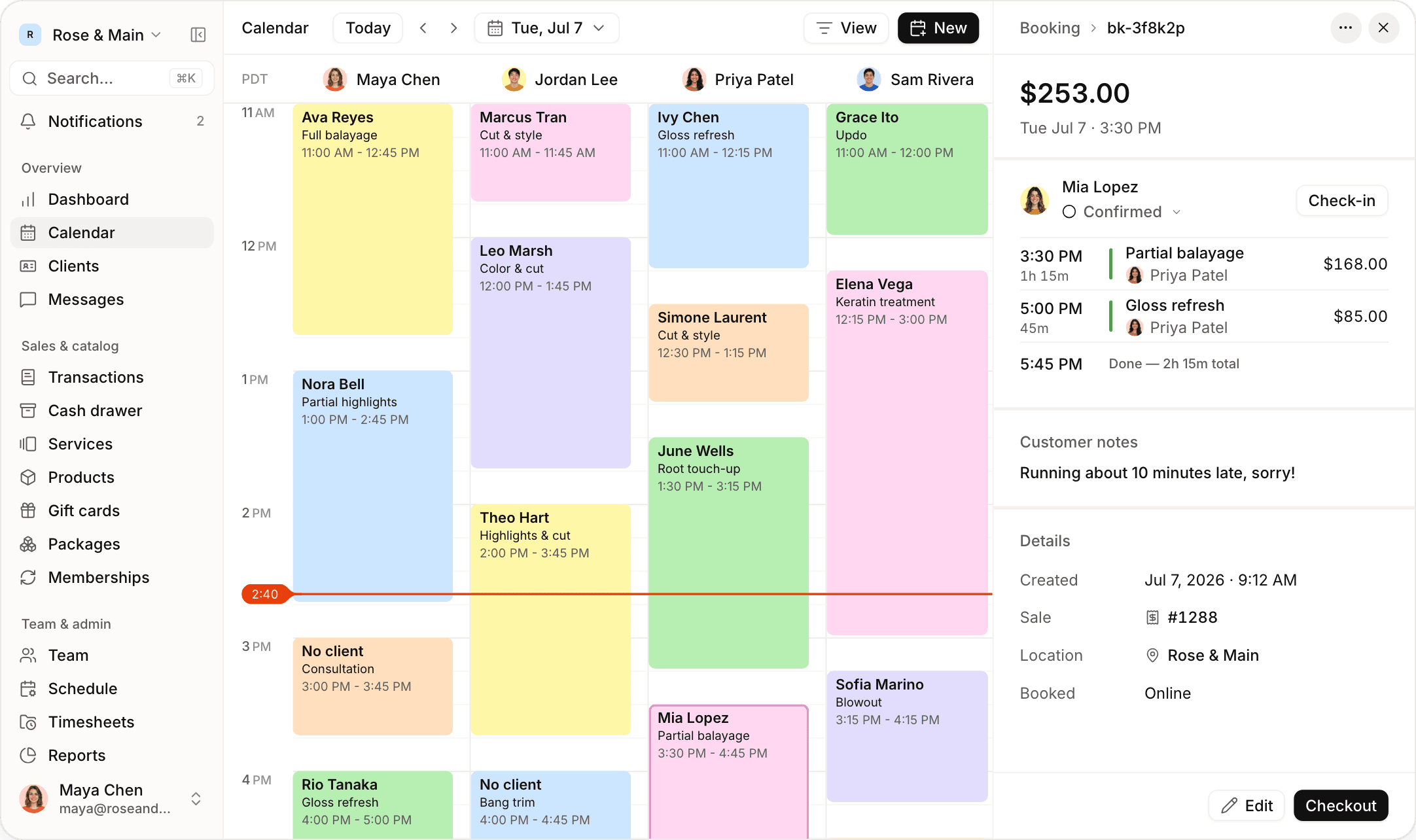
Book, check in and check out clients without leaving the calendar, with every provider on one screen and every location a click away.

Book group appointments
Book a party of three as one appointment, each person with their own provider and their own status. If one guest doesn’t show, the others carry on, and checkout opens when everyone is done.


Schedule and check out from one screen
Confirm, check in, start and complete an appointment with one tap each, then check the client out in the same panel. If a client cancels or doesn’t show, Jude applies your policy and calculates the fee.
See every appointment’s status at a glance
Tell confirmed, checked-in, in-service, completed, no-show and canceled appointments apart by color. The colors are the same on the calendar and in the booking panel.

Automate confirmations and reminders
Send unconfirmed clients a text two days before their appointment. When they reply YES, the appointment is confirmed on your calendar. Anyone who hasn’t confirmed gets a reminder the day before.
Manage every location from one calendar
Switch between locations to see each team in its own time zone. Providers can work at more than one location, and a booking at one blocks that time at the others.

Block out time
Add a one-time or repeating block for lunch, training or a break. Clients can’t book that time online, and your front desk can see why it’s blocked.
Drag and drop to reschedule
Drag an appointment to a new time, or drag its edge to make it longer or shorter. You don’t have to open a form or retype anything.

Also on the calendar
Day, week and month views
The calendar remembers the view you used last.
Filter by provider
Show only the people you want to see.

Double-booking protection
Warns your team, and blocks the time online.

Back-to-back services
Book several providers in one visit.

Appointment notes
See your team’s note and the client’s note together.

Working hours
See when each person is off at a glance.
“A bridal party is one booking now, and if someone doesn’t show, we just mark that person as a no-show. With our old system, it was five separate bookings and checkout was a mess.”
“I run two locations an hour apart, and I used to keep two browser tabs open all day. Now I switch locations in the calendar, and it warns us if a stylist is already booked at the other one.”
Frequently asked questions
Browse the rest of our features
 Online booking
Let clients book themselves online
 Payments
Take payments and pay your team
 Retail & inventory
Sell products and track stock
 Clients
Keep every client’s history and notes
 Messaging
Text clients and send reminders
 Memberships
Bill members automatically
 Gift cards & packages
Sell gift cards and packages online
 Team & scheduling
Manage hours, roles and prices
 Commissions & payroll
Calculate commission, hours and tips
 Reports
See how your business is doing
Browse by business type








Run your business from your phone
Get the full app on iPhone and iPad. Manage your calendar, check clients out with Tap to Pay, and text clients from anywhere.

 Maya Chen
 Jordan Lee
 Priya Patel
 Sam Rivera
Give your front desk superpowers
Set up in an afternoon. Try it free for 14 days.